
How to connect and configure Ricoh Copiers for TBS Kiosks/Cpad Control
How to connect and configure Ricoh Copiers for TBS Kiosks/Cpad Control
Additional Parts Needed: Cartadis Cable XCOJL231-KIT017 (provided by TBS)
CONFIGURING THE COPIER/KIOSK INTERFACE
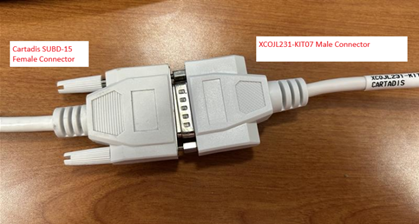
Connect the SUBD-15 pin male connector of the XCOJL231-KIT07 interface to the SUBD-15 pin female connector of the Cartadis Cable and screw the two connector wheels (see picture below)
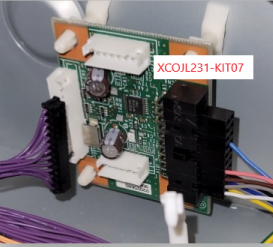
Connect the 10 pin connector of the XCOJL231-KIT07 to the optional counter interface (Manufacturer Part Number 417111) on the Ricoh copier (see picture below)
CONFIGURING RICOH COPIER INTERFACE (documented by a Ricoh Technician)
CONFIGURING TBS KIOSK/CPAD
How to setup TBS9900 and Kiosk/cPad Stand for copier control and printing | TBS Libraries KB
ADDITIONAL INFORMATION
The CPAD needs to be updated to the latest version