
How to change the Hold or Default Credit amount in Nayax
The Cause
Nayax Devices have a default credit or a HOLD that the customer wants to be changed.
The Resolution
Log into Nayax:
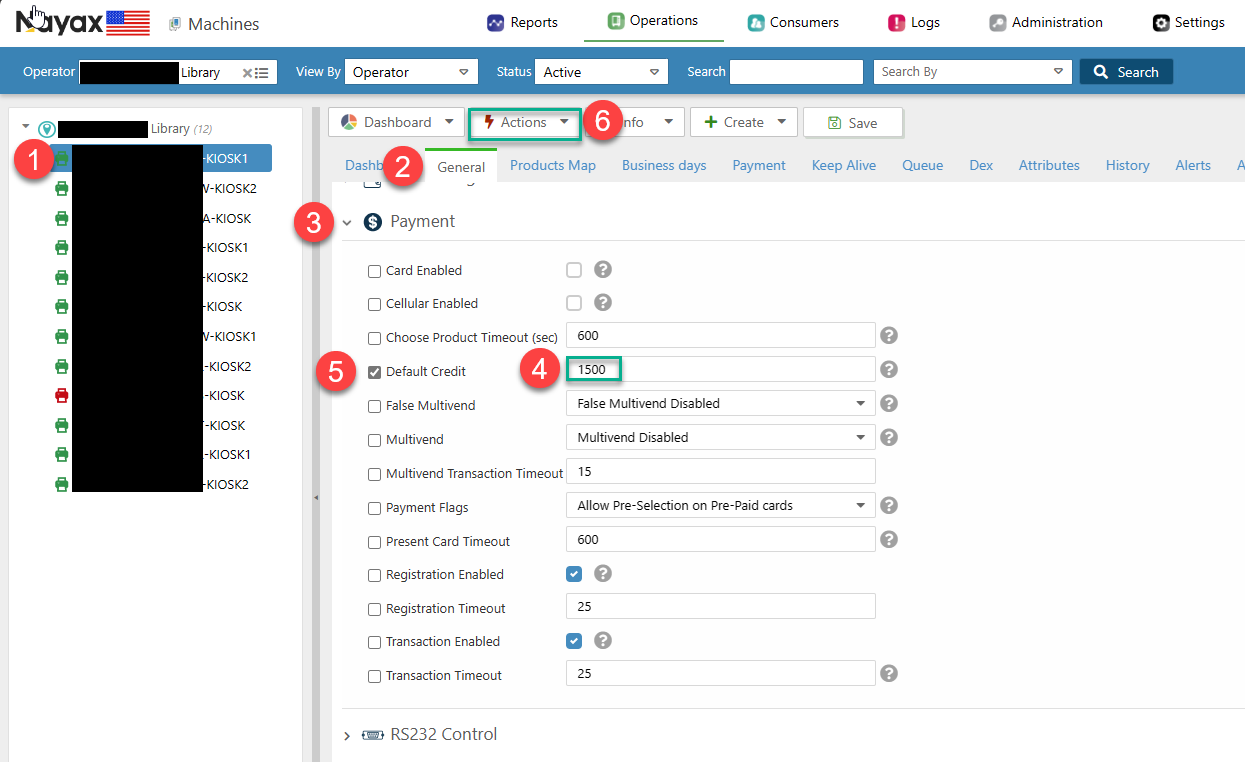
Select the device.
Select the General Tab.
Select the Payment Dropdown.
Enter the value of the DEFAULT CREDIT with no decimal (1500 is 15.00).
Select the checkbox of the DEFAULT CREDIT to update.
Click ACTIONS.
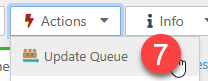
Click Update Queue. (This will update any setting that is checked in Step 5.)
The unit should update itself within 10 minutes. If it doesn't, please follow the steps here to reboot: How to pull settings and/or reboot a nayax device
Additional Notes 2022-07-22
Default credit is the hold amount if the MDB flags is set to '128 use max price for auth', this is for when connected to a copier.
Default credit works as the maximum charge if MDB flags is '02 preselection'. This would be the setting for a print only kiosk mode. Idle mode is a separate configuration that goes with preselection to make single tap work.
There's also a setting on the board for maximum credit charge but it only works as an upper bound to what's already set on nayax. I think it's $99 on the board by default.