
How to Pull Settings and/or reboot a Nayax Terminal on a vPOS Touch Device
The Cause
Nayax device is not getting all settings configured to the terminal and/or won't reboot after pushing settings to device.
The Solution
When in front of the device, follow the steps below to pull settings or restart the device.
- Press the 3 white lines on the Nayax reader:
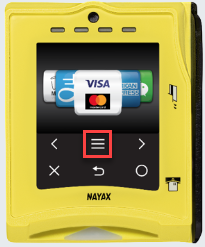
- Select Technician Mode
- Enter 123123 (password)
TO PULL SETTINGS FROM NAYAX CLOUD
- Scroll down to "Poll" and tap the arrow on side to initiate.
TO RESTART/REBOOT DEVICE
- Scroll down to "Reboot" and tap the arrow on side to initiate.