
Updating the 9900 board firmware
Tools needed to update the board firmware:
- Serial Download Harness (Provided by TBS)
- Serial to USB Converter
- SEM Flash Tool Software (Provided by TBS)
Connecting the Download Harness to your Computer
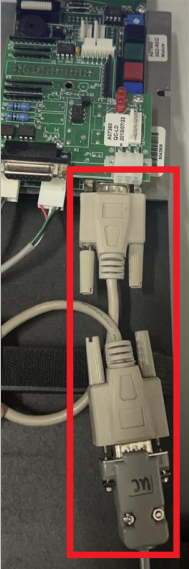
First you will connect the Serial Download Harness to the Serial Extender located on the bottom right of the board.
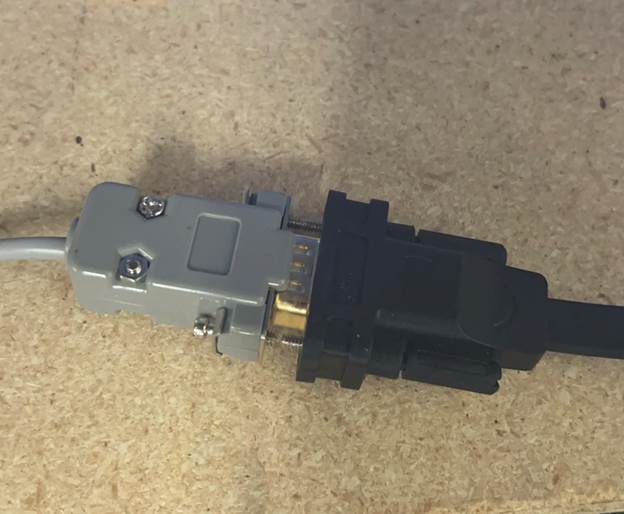
Next you will connect the other side of the Serial Download Harness to the Serial to USB Converter and plug the USB side into your computer.
Setting up the SEM Flash Tool.exe on your computer
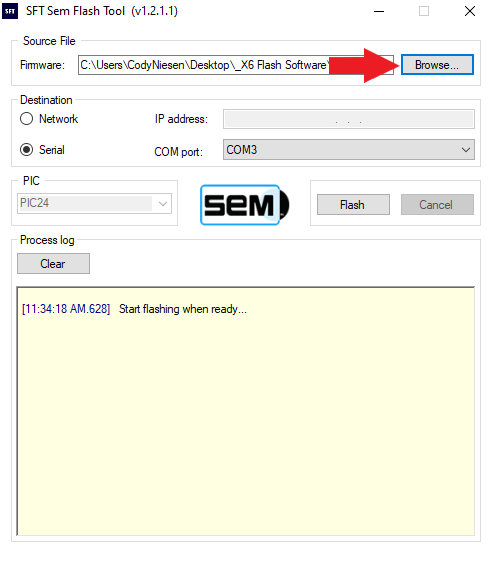
You will want to select browse and select the firmware file that was provided by TBS
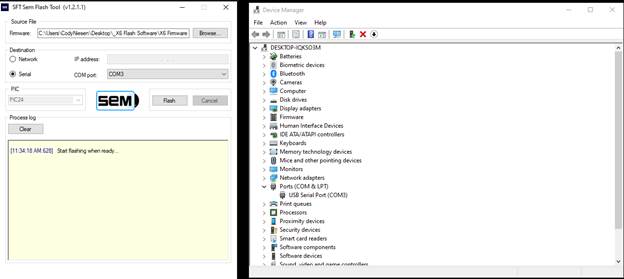
Once the file is selected you will want to select the COM port the USB Serial port is connected to, this can be located using device manager as shown above. After selecting the correct COM port click on Flash
NOTE: WHEN THE UPDATE IS IN PROGRESS DO NOT USE THE TOWER OR EXIT THE SOFTWARE UNTIL THE PROCESS IS COMPLETED
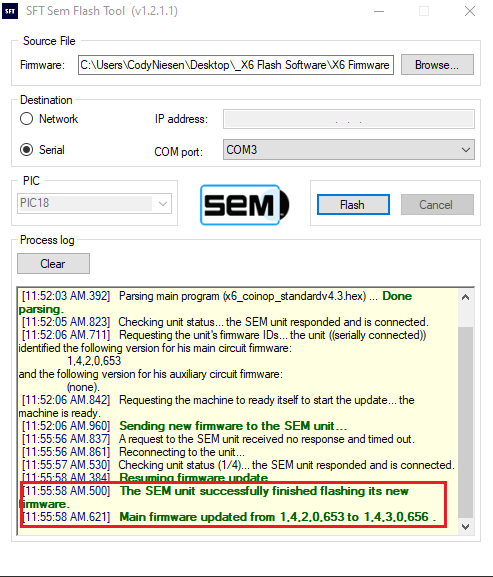
When the download is completed you will see it on the log below. Once completed it is safe to exit out of the Flash Tool and unplug the connections from the board and your PC.