
How to Configure MEI/CPI High Capacity CF7000 and VN27C2R Bill Recycler for TBS 9900/Kiosks
CF7000 High-Capacity Coin-Op
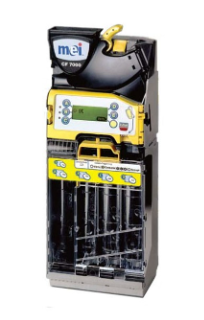
Configure CF7000 High-Capacity Coin-op
-
Calibrate Coin Tubes: (NOTE:This must be done with EMPTY TUBES. If you have coins in the tubes, they must be removed.)
MENU button (Bottom Right Yellow Button) > Setup > Enter Code ‘A, B, C’ to get into the Setup Menu > Press ‘D’ for next page 5 times > General > Calibrate Tubes > Select (Yellow Button)
-
Calibrate PARK:
Remove the tubes from the device and press the YELLOW button twice. This will allow the solenoids to test and 'park' if stuck/jammed.
Confirm CF7000 High-Capacity Coin-Op Firmware
MENU button (Bottom Right Yellow Button) > Setup > Enter Code ‘A, B, C’ to get into the Setup Menu > Press ‘D’ for next page 7 times > Test > Press ‘D’ for next page 2 times > Information > Coin Changer > SW Version
Latest Version: v1.27
VN27C2R Bill Recycler
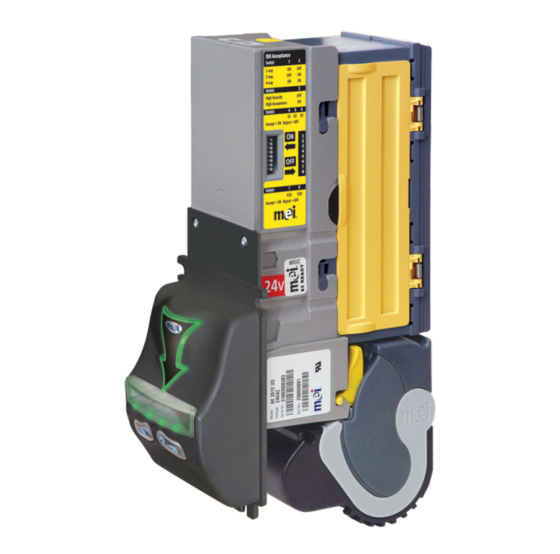
Configure VN27C2R Bill Recycler
-
Configure Bill Acceptor Option Switches on the side of the unit. They should be as follows:
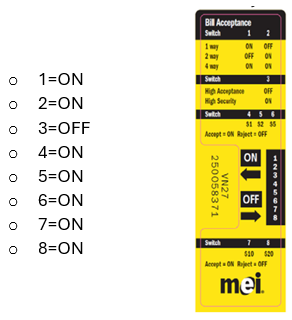
Configure Recycler TBS Default Settings
To get into the Setup Menu, you must enable this, as it is usually hidden to prevent it from being selected accidentally.
To enable access to the setup menu, press the SELECT switch for 4-5 seconds until a ‘—‘ before following the procedure below within 2 seconds.
When the MODE switch is pressed and held for 2 seconds, the unit will stop displaying the bill count and will display the current mode. The text will flash. Each press of the MODE switch will toggle to the next mode. If a mode is selected and the user takes no further action for 30 seconds, the bill count display mode will be automatically selected.
The settings below are the TBS Default Settings for the Bill Recycler. They should be confirmed for troubleshooting.
• Recycled Bill (rb) = $1 (1)
• Interface (IF) = Level 3 (L3)
• Capacity (CA)= 25 notes (25) Note: Can go to 30. This setting is for how many $1s you want to store in the recycler.
• Par Level (PL)= 12 notes (12)
• High Visibility Bezel (Hb)= ‘Rainbow’ mode (bLEnd )
• Auto Inhibit (AI)= No *DEFAULT* (No means the inventory will consider more coins as change so that the $1 inventory isn't depleted as fast. This will use more of the coin inventory than if set to yes. YES means that while Recycling $1s, the $20 is disabled with 18 $1s, then enabled when there are 19 $1s or higher. $10 is disabled when there are 8 $1s and then enabled with 9 $1s or higher. $5 is disabled when there are 3 $1s and then enabled when there are 4 $1s or higher.
• Profile (Pr) = CL
NOTE: If you have any questions about the menu structure, it is on the back of the Bill Acceptor, along with the Error Codes.
Check Recycler Firmware Version
During Powerup, the display shows the VNR firmware. It will flash 2 firmware versions that are important. These are known as A (Acceptor) and R (Recycler). They will flash as shown below:
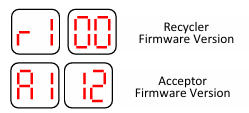
The Latest Firmware versions are: r1.31 and a1.43
How to Install and Troubleshooting Tips for Programming Issues:
For more information: MEI VN2700R Recycler Guide.pdf