
Restarting "ePRINTit Print Delivery" Service
If your ePRINTit Cloud dashboard shows that the service is "Offline" for your library, don’t worry! This usually means that the ePRINTit software on your server or PC isn’t currently running. You can easily get things back online by starting or restarting the ePRINTit Print Delivery service. Just follow the steps below, and you’ll have your ePRINTit service up and running again in no time.
How to Start or Restart the ePRINTit Print Delivery Service
Here’s a step-by-step guide to get your ePRINTit service back online:
1. Log Into the Server or PC with ePRINTit Installed
Make sure you have administrative rights, as you’ll need them to manage system services.
If you’re not sure which computer hosts ePRINTit, check with your IT team.
2. Open the Windows Services Window
Press Win + R on your keyboard to open the Run dialog box.
Type services.msc and press Enter. This will open the Windows Services window, where you can view and control background services.
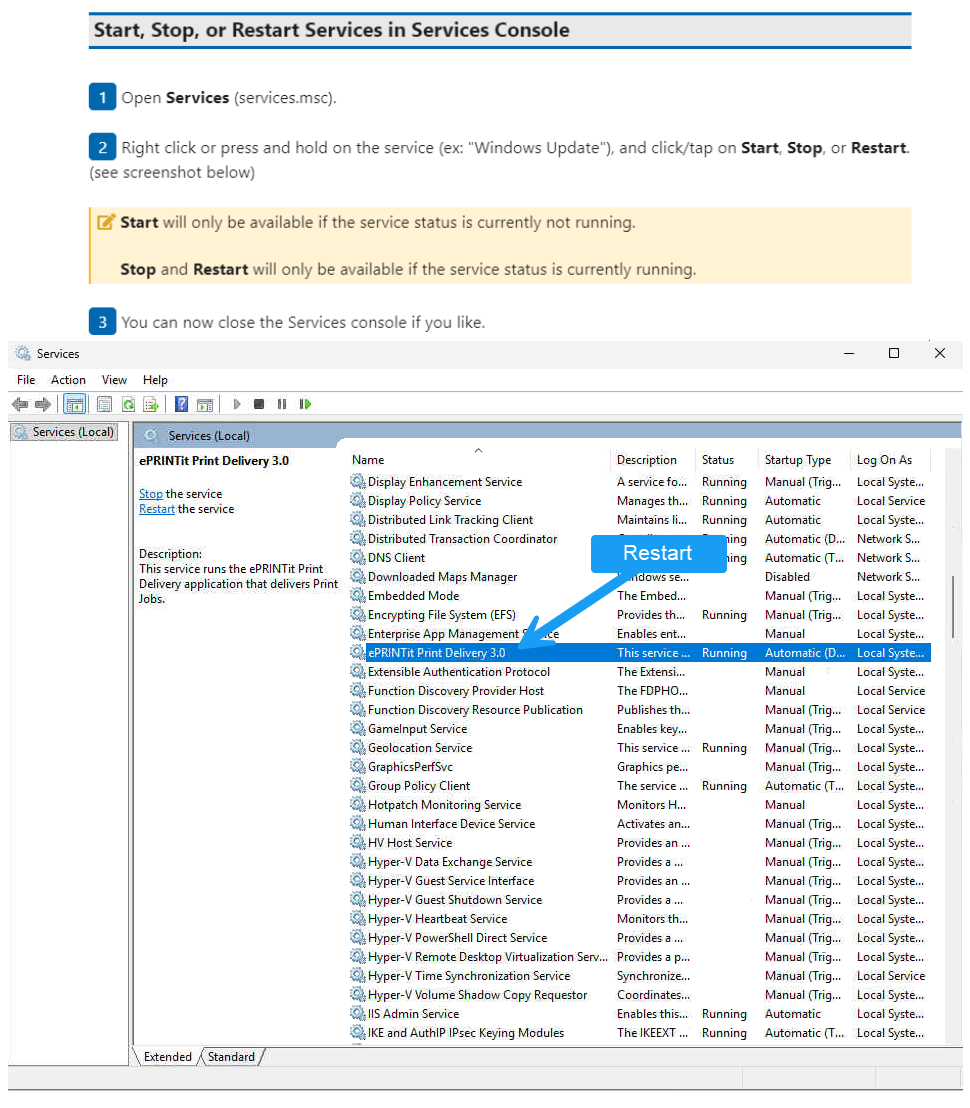
3. Locate the "ePRINTit Print Delivery" Service
In the Services window, scroll through the list to find ePRINTit Print Delivery.
The list is alphabetical, so it should be easy to spot.
4. Start or Restart the Service
-
If the service is not running:
Right-click on ePRINTit Print Delivery and select Start.
-
If the service is already running but you want to restart it:
Right-click on ePRINTit Print Delivery and select Restart.
After starting or restarting the service, wait a few moments. The ePRINTit Cloud dashboard should update to show your library as "Online." If it doesn’t update right away, try refreshing your browser or wait a few more minutes.
Why Is My ePRINTit Service Offline?
The ePRINTit Cloud service relies on a background application called ePRINTit Print Delivery to connect your devices to the cloud. If this service stops running for any reason—such as a server reboot, Windows update, or an unexpected error—the cloud dashboard will report your library as "Offline."
The good news is that you can usually fix this by starting or restarting the ePRINTit Print Delivery service on the PC or server where the software is installed.
What If the Service Doesn’t Stay Online?
If the ePRINTit Print Delivery service keeps stopping or won’t start, there may be a deeper issue at play. Here are a few things to check:
Check for Windows Updates: Sometimes, pending updates require a restart to function properly.
Review Recent Changes: If any software or hardware changes were made to the server, they could affect the service.
Consult ePRINTit Support: If you continue having trouble, contact your IT support team or reach out to ePRINTit support for help. Be ready to share any error messages you see.
Tips for Smooth Operation
Set the ePRINTit Print Delivery service to start automatically. You can do this by right-clicking the service, selecting Properties, and setting the Startup type to Automatic.
Regularly check that your server or PC stays powered on and connected to the internet.
Keep your Windows operating system up to date for the best compatibility and security.
By following these steps, you’ll quickly resolve most "Offline" status issues in your ePRINTit Cloud dashboard. If you need more help, don’t hesitate to reach out for support. We’re here to help!