
Unauthorized Operation Error when deleting a re-print job in TBS Portal
If you've encountered an 'Unauthorized Operation' error while attempting to delete a print job under the TBS Portal Re-Print tab, you're not alone. This error can be frustrating, but it's usually straightforward to resolve. Let's dive into the cause and the simple steps you can take to fix it.
The Cause
The 'Access Denied' error typically arises when you try to delete a job under the re-print tab. This occurs because the necessary permissions to access the PaperCut 'data' folder, where archived jobs are stored, are not granted to the user attempting the deletion. Without the appropriate permissions, the system restricts access, resulting in the error message you're seeing.

The Resolution
To resolve this issue, you'll need to provide 'Users' permissions to the PaperCut 'data' folder. This will allow users to access the archived job data and successfully delete print jobs without encountering the 'Access Denied' error. Here's how you can do that:
Navigate to the location of the PaperCut 'data' folder on your system.
Right-click the 'data' folder and select Properties from the context menu.
In the Properties window, switch to the Security tab.
Click on the Edit button to change permissions.
In the permissions window, check if Users is listed. If not, click Add to include it.
Once 'Users' is selected, ensure that you grant appropriate permissions, typically Read and Write access.
Click Apply and then OK to save the changes.
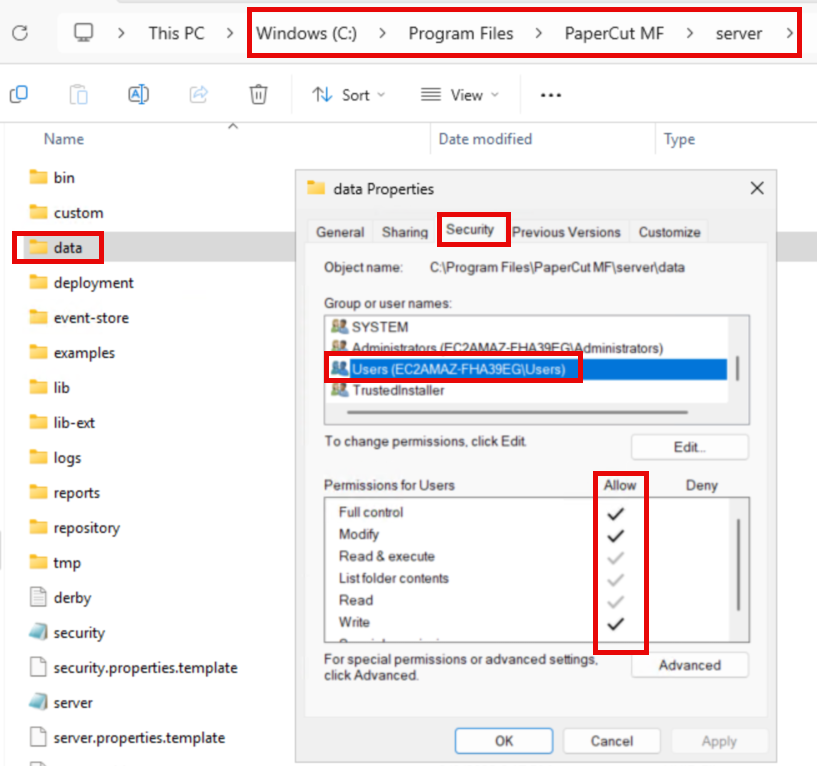
By adjusting these settings, you should be able to delete print jobs without any errors. If you continue to experience issues or need further assistance, don't hesitate to get in touch. Our support team is ready to help you resolve any challenges you might encounter!