Switch CirePaperCutIntegration.exe to use direct DB instead of Cire WebAPI calls
The Cause
When PaperCut has a large number of users, the nightly sync takes longer than the closed hours and causes issues during the day if the sync is still running. You may also notice SQL and IIS high usage during this time.
The Solution
Switch the Integration tool to connect directly to the db to validate instead of using the default Cire WebAPI.
- Use CireRemotePapercutIntegration.exe Version 6.0.0.0
- In the ExternalInterfaceConfig.xml in C:\Programdata\ITS\Cire\Server\ change the connectionmode to Database <ConnectionMode>Database</ConnectionMode>
- Copy the SecureSettings.bin folder to C:\ProgramData\ITS\Cire ( you may not need to do this as Cire and PaperCut Integration are on the same server )
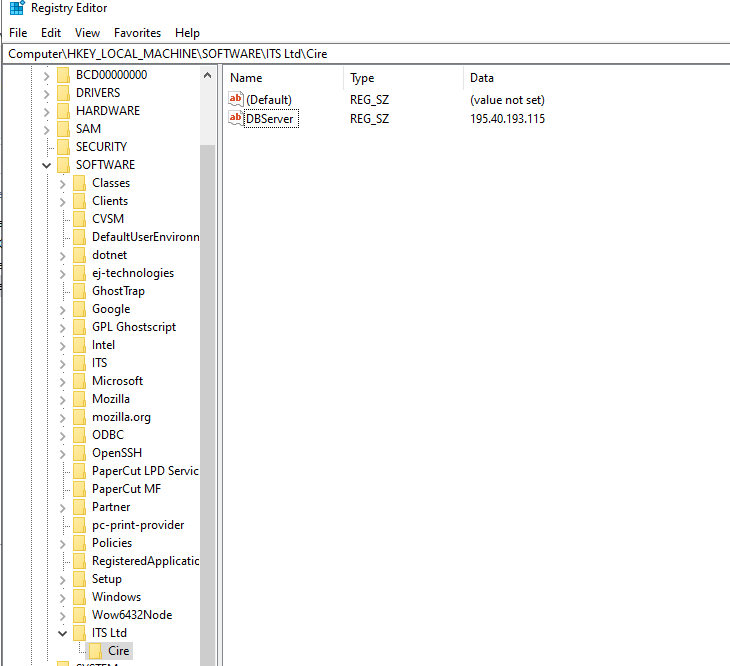
- Add the following Registry HKLM\SOFTWARE\ITS Ltd\Cire in Cire Key add DBServer REG_SZ the value should be the SQL DBSERVERNAME/Instance ( again you most probably will not have to do this as Cire is on the same server ).