
Where to edit hostname for MyPC if moving to a new server or changing to IP Address
The Cause
If you want to change the server's name due to a migration, or DNS issues and want to use the IP address instead of host name when connecting to the Staff URL.
The Solution
You must edit the settings in Cire and the registry entries below:
1. Log into http://servernamet/mypc as a TA User
2. Click on CIRE on the top left corner, go to the SYSTEM tab, and then ‘Product Settings'
3. Make sure to choose CIRE and MYPC in order to change both Server settings.
4. Click UPDATE on each Product Tab you choose.
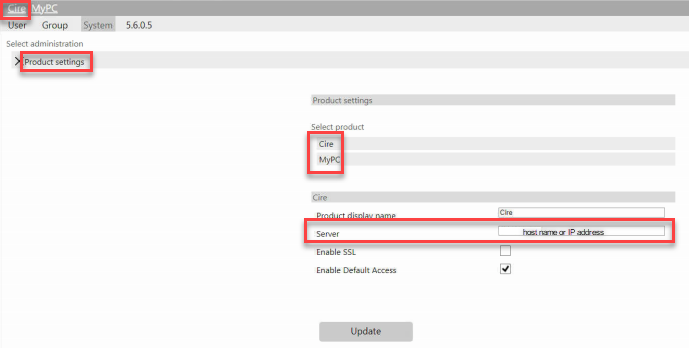
5. Open Registry Editor on the server and edit the following:
- Open up the registry to the following:
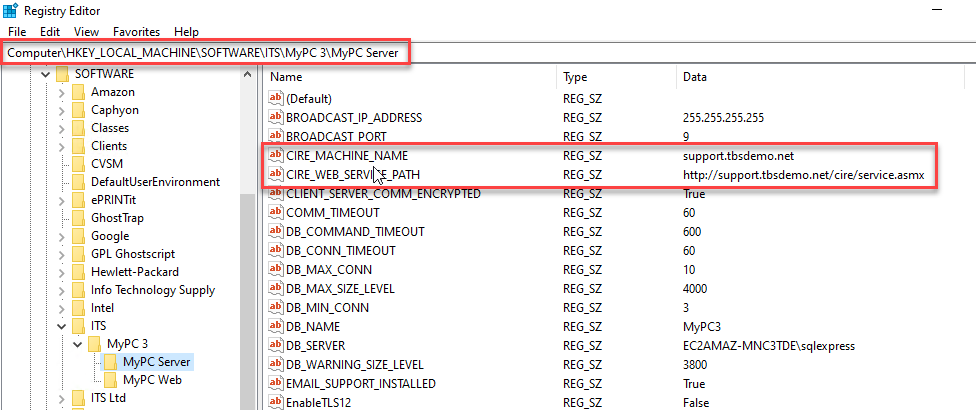
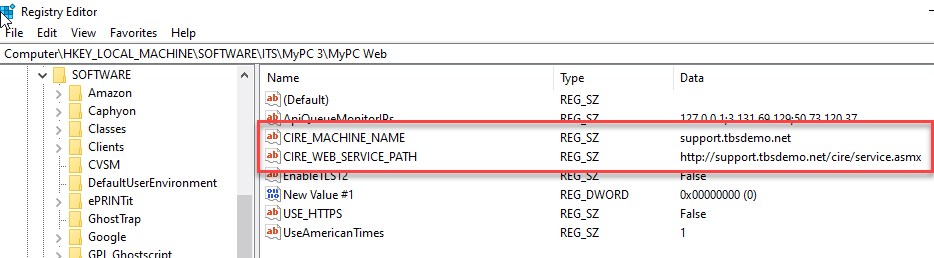
Change the CITE_WEB_SERVICE_PATH and CIRE_MACHINE_NAME to the new server name or IP Address.
- Restart ITS Cire Services and MyPC 3 Server Services after the changes above are made.
- Restart IIS (World Wide Web) Service as well.