
How to Configure MEI/CPI High Capacity Gryphon and Talos Bill Recycler for TBS 9900/Kiosks
Gryphon High-Capacity Coin-Op
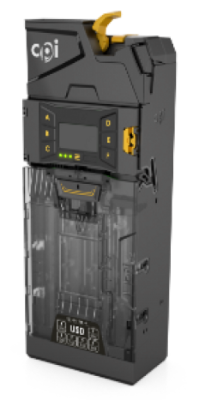
Configure Gryphon High-Capacity Coin-op
-
Enable Report Safe Count
MENU button (3 Horizontal lines) > Setup > Machine Options > Press 'D' for Report Safe Count > change the option to ON > SAVE.
-
Enable Coin twice in setup: (NOTE: This setting is to show an additional tube count for .25 in the Audit menu of the 9900. Ex: 285 quarters total in the 4 .25 tubes. You will see 2 .25 tubes in the audit. 1 at 255 and 1 at 30 coin.
MENU button (3 Horizontal lines) > Setup > Machine Options > Press 'F' for next page > Coin twice in setup > change the option to 'On' > Save.
-
Calibrate Coin Tubes: (NOTE: This must be done with EMPTY TUBES. If you have coins in the tubes, they must be removed.)
MENU button (3 Horizontal lines) > Setup > Press 'F' for next page > General > Calibrate Tubes > START
Confirm Gryphon High-Capacity Coin-Op Firmware
MENU button (3 Horizontal lines) > Setup > Test > Info > Changer > ‘App’ firmware
The Latest Firmware is V1.07.00
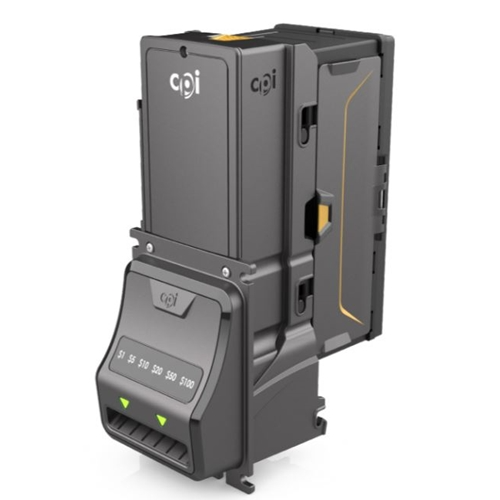
Note: Face plate may differ.
Configure Talos Bill Recycler
-
Refer to the Talos Coupon Guide. This will give you the Coupon that needs to be filled out and instructions on how to program the machine.
Hold the Mode button on the recycler to enter the menu. When the MODE switch is pressed and held for 2 seconds, the unit will stop displaying the bill count and will display the current mode. The text will flash. Each press of the MODE switch will toggle to the next mode. If a mode is selected and the user takes no further action for 30 seconds, the bill count display mode will be automatically selected.
Press and hold Mode to cycle through the options and stop when CP is displayed.
-
Press Select to enter the Coupon Mode.
Once Coupon mode is activated, the bezel lights will rapidly flash.
Insert the completed Configuration Coupon
-
Watch the bezel LEDs and count the flashes when the configuration coupon is returned.
10 flashes – Configuration coupon was accepted, and the unit was successfully programmed.
1-5 flashes – Coupon rejected. The number of flashes corresponds to the coupon section that was improperly filled out. Try again once the coupon is updated/fixed.
7 Flashes – Coupon not read. Confirm the coupon is correct and try again.
Recycler TBS Default Settings
When the MODE switch is pressed and held for 2 seconds, the unit will stop displaying the bill count and will display the current mode. The text will flash. Each press of the MODE switch will toggle to the next mode. If a mode is selected and the user takes no further action for 30 seconds, the bill count display mode will be automatically selected.
The settings below are the TBS Default Setting for the Bill Recycler. For troubleshooting, these should be confirmed.
• Accepted Bills (Ab) = 1 (1)
• Recycled Bill (rb) = $1 (1)
• Capacity (CA)= 25 notes (25) Note: Can go to 30. This setting is for how many $1s you want to store in the recycler.
• Auto Inhibit (AI)= No *DEFAULT* (No means the inventory will consider more coins as change so that the $1 inventory isn't depleted as fast. This will use more of the coin inventory than if set to yes. YES means that while Recycling $1s, the $20 is disabled with 18 $1s, then enabled when there are 19 $1s or higher. $10 is disabled when there are 8 $1s and then enabled with 9 $1s or higher. $5 is disabled when there are 3 $1s and then enabled when there are 4 $1s or higher.
• Interface (IF) = Level 3 (L3)
NOTE: If you have any questions about the menu structure, it is on the back of the Bill Acceptor, along with the Error Codes.
Check Recycler Firmware Version
Hold the Mode button on the recycler to enter the menu. When the MODE switch is pressed and held for 2 seconds, the unit will stop displaying the bill count and will display the current mode. The text will flash. Each press of the MODE switch will toggle to the next mode. If a mode is selected and the user takes no further action for 30 seconds, the bill count display mode will be automatically selected.
Press and hold MODE to cycle through the options and stop when SF is displayed and hit SELECT.
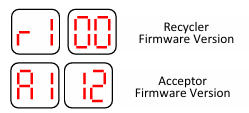
The Latest Firmware versions are: r1.05 and a1.22
How to Install and Troubleshooting Tips for programming issues: